

Introduction
At least once, every trader has dreamed of building their own automated trading bot.
Maybe you’ve tried asking ChatGPT to write the code for you, or you downloaded a script online — but the result was the same: compile errors, incomplete logic, frustration.
The truth is, programming a working bot from scratch requires time, knowledge of languages like C++ (for MetaTrader) C# or Python, and a solid understanding of the markets.
But today, in 2025, there’s a completely different solution: create complete automated trading strategies without writing a single line of code, thanks to AlgoBuilderX — the first visual builder fully integrated with cTrader Automate.
In this guide, you’ll learn step by step how it works, how to build your first bot, and why no-code trading is changing the automation landscape forever.
What Is an Automated Trading Bot and Why It Matters
A trading bot (or cBot on cTrader) is software that executes market trades automatically based on predefined logical conditions.
In practice, the bot:
- constantly analyzes charts and indicators,
- opens and closes trades when specific conditions occur,
- eliminates emotions and subjective decision-making.
👉 The benefit? You can turn any trading idea into an objective system that works for you 24/7.
If you can’t code, building such a bot might seem impossible — until you try AlgoBuilderX.
The New Approach: Building a Bot Without Coding
For years, automation was a privilege of programmers fluent in C++ (for MetaTrader), C# (for cTrader Automate) or Pine Script (for TradingView).
Writing a bot meant hundreds of lines of code, debugging, compile errors, and endless testing.
AlgoBuilderX changes everything:
“Build complex trading logic by dragging and connecting blocks instead of writing code.”
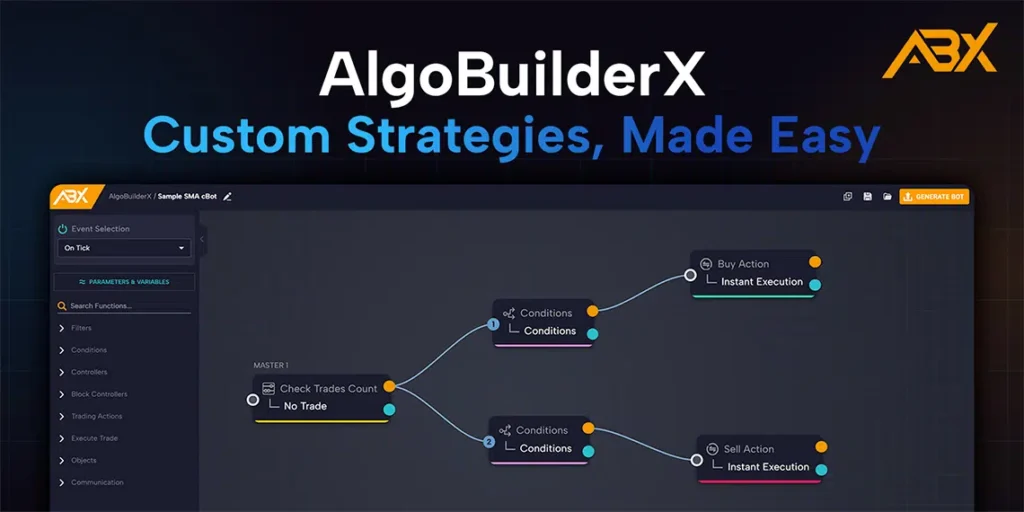
It uses a visual block interface where you combine indicators, conditions, filters, and actions like assembling a logical puzzle.
Once your strategy is ready, one click exports a .algo file fully compatible with cTrader Automate, ready to run or optimize.
Step-by-Step: Build an RSI Bot With AlgoBuilderX
This tutorial is written for total beginners — even if you’ve never opened AlgoBuilderX before.
You’ll create a bot that sells when RSI > 70 (overbought) and buys when RSI < 30 (oversold).
1️⃣ Sign Up and Confirm Your Email
Go to algobuilderx.com
Click Start App, create your account, and confirm your email — this unlocks export capability.
Free Plan perks:
- 10 export daily
- generated bots only work on demo accounts.
- all basic blocks unlocked (advanced blocks in Premium/Pro)
✅ You can build and run on demo real bots — even on the Free plan.
2️⃣ Watch the Guided Tutorial
On your first login, you’ll see a short interactive tutorial with embedded YouTube clips.
Watch them — in a few minutes, you’ll understand how to drag, link, and configure blocks.
3️⃣ Create a New Project
Click “Create New Project” on the top toolbar.
The builder interface will appear:
- Left panel: all block categories (Controllers, Conditions, Execute Trade, etc.)
- Center canvas: where you visually assemble your logic
- Double-click any block: open its settings window
Step 1 – Check for Open Trades
This prevents the bot from opening multiple positions at once.
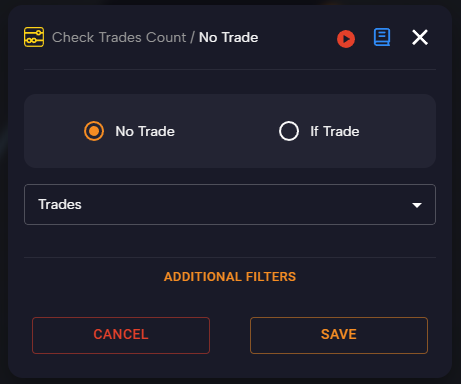
- Open Controllers
- Drag “Check Trades Count” to the canvas
- Double-click to open it
- Choose “No Trade” → “Trades”
- Click Save
When the block turns colored and its output dots fill, it’s ready.
👉 Meaning: run the logic only if there are no open trades.
Step 2 – Create the Sell Condition (RSI > 70)
- Open Conditions
- Drag “Conditions” block
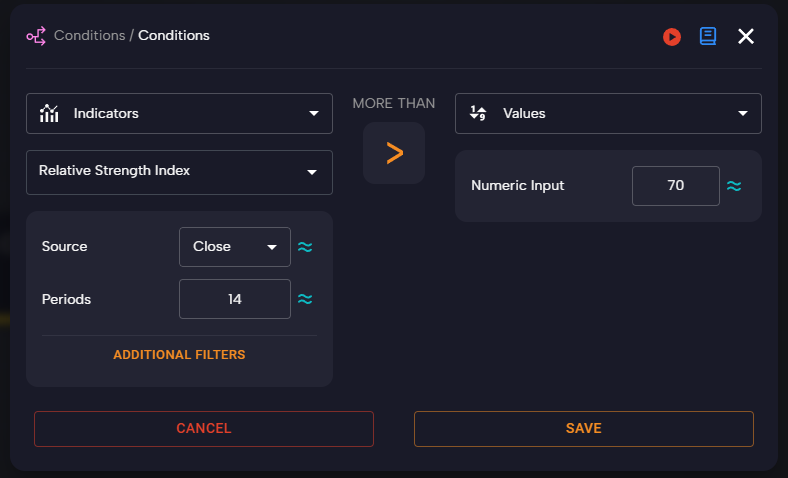
- Double-click and configure:
- Left: Indicator → RSI (14)
- Operator: More Than
- Right: Value = 70
- Save
- Connect Check Trades Count → TRUE output (orange) → Conditions input
“If no trades are open and RSI > 70 → continue to next step.”
6️⃣ Step 3 – Execute the Sell Action
- Open Execute Trade
- Drag “Sell Action”
- Double-click and set:
- Fixed Lot: 0.01
- Take Profit: 30 pips
- Stop Loss: 20 pips
- Save
- Connect TRUE output of RSI > 70 → Sell Action input
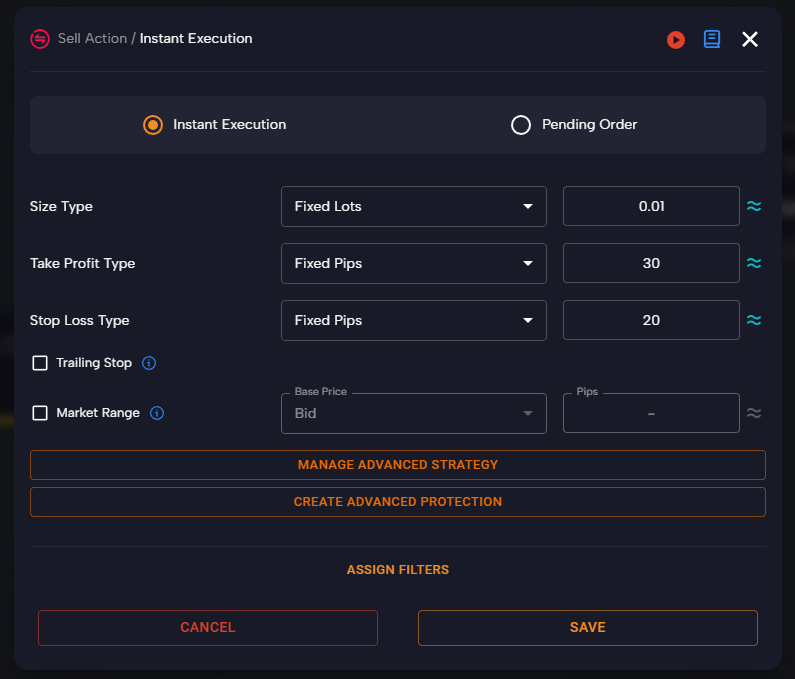
💡 The values 30/20 used for Take Profit and Stop Loss are placeholders — they serve purely as examples for this tutorial and should not be interpreted as trading advice or optimized settings.
Step 4 – Duplicate for the Buy Condition (RSI < 30)
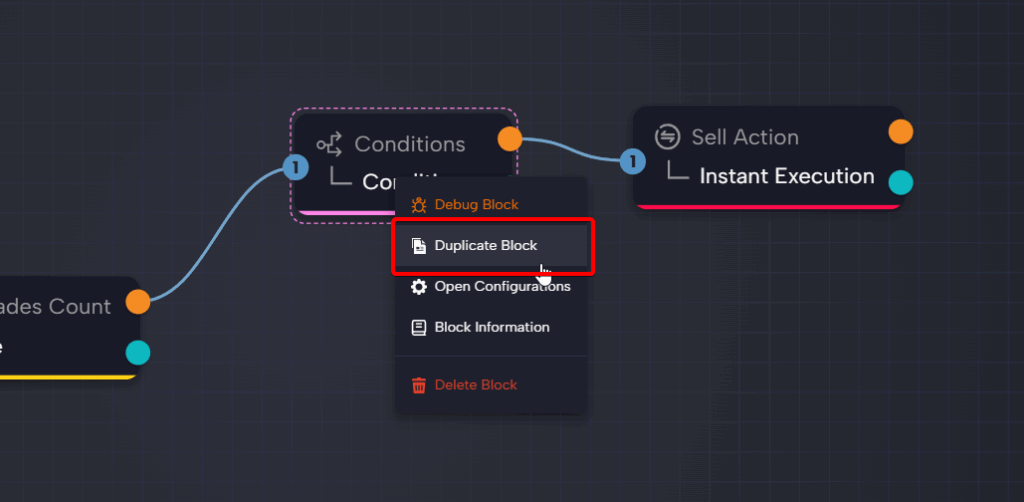
- Right-click Conditions (RSI > 70) → Duplicate block
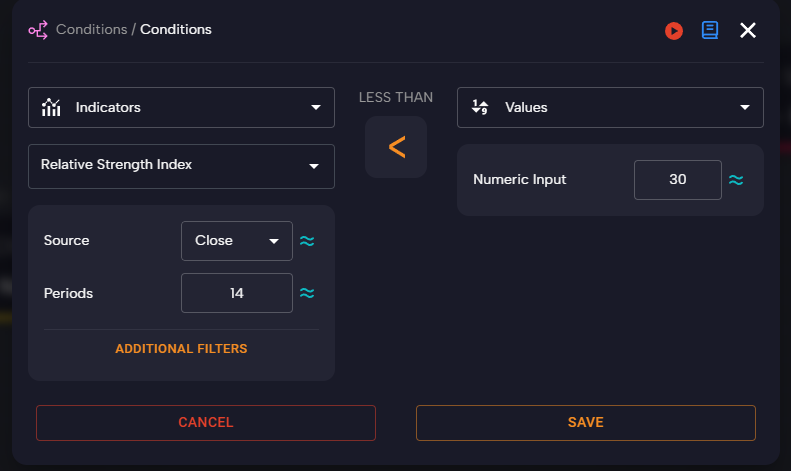
- Double-click duplicate:
- Operator: Less Than
- Value: 30
- Save
- Connect its TRUE output to Check Trades Count TRUE output chain
8️⃣ Step 5 – Execute the Buy Action
- From Execute Trade, drag “Buy Action”
- Double-click and set same parameters as Sell (lot 0.01, TP 30, SL 20)
- Connect TRUE output of RSI < 30 → Buy Action input
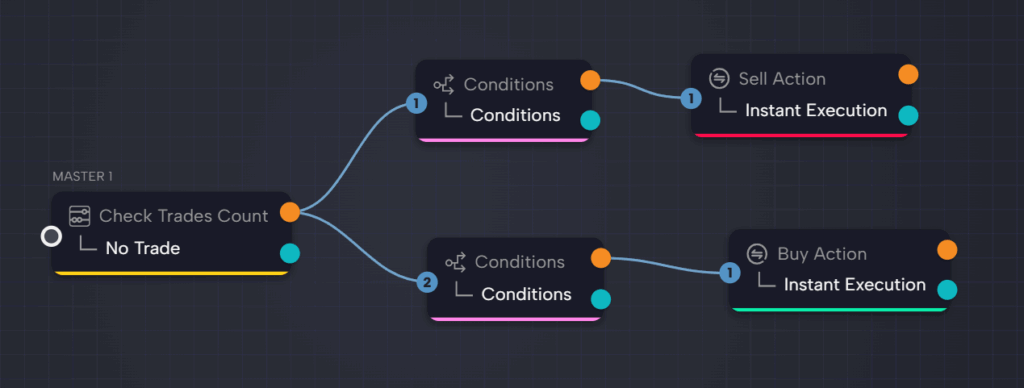
✅ Now your bot logic is complete:
- RSI > 70 → Sell
- RSI < 30 → Buy
Step 6 – Generate and Install the Bot
- Click “Generate Bot” (top right)
- AlgoBuilderX exports a .algo file
- Double-click it → opens in cTrader Automate
- You can now:
- test on demo,
- backtest with historical data,
- or run it in cTrader Cloud (free 24/7).
Important Notes
• Free Plan allows 10 exports/day — perfect for learning and testing.
• Confirm your email to unlock exports.
• If a block looks “off” or gray, open it, click Save, and re-connect the TRUE output.
What You’ve Learned
You’ve just built a working RSI trading bot in under 10 minutes — no coding required.
You learned how to:
- use Controllers, Conditions, and Execute Trade blocks
- link logical outputs
- set entries/exits and export to cTrader
Next, try adding time filters, volatility filters (ATR), or trailing stops to refine performance.
💬 Join the AlgoBuilderX Community
Meet hundreds of traders on AlgoBuilderX Discord.
Share projects, download templates, and discuss strategies in real time — it’s the fastest way to grow as an algorithmic trader.
Conclusion
Automated trading is no longer reserved for coders.
With AlgoBuilderX, anyone can visually build and export real bots to cTrader Automate — in minutes, not weeks.
👉 Sign up free on AlgoBuilderX.com,
confirm your email, and start building your first no-code strategy today.
The future of trading is no-code — and now you’re part of it.
FAQ
Do I need programming skills to use AlgoBuilderX?
No — just drag and connect visual blocks, then export your bot in .algo format.
Can I use this guide on other pairs or timeframes?
Yes. Start with EURUSD M15/M30, then adjust RSI/TP/SL to your market’s volatility.
Is the Free Plan enough to publish a bot?
Yes — you can build and export up to 10 bots/day. Unlock limits with Premium/Pro.
Why doesn’t my Condition block trigger?
Ensure you clicked Save after editing and connected the TRUE output properly.
Can I run the bot 24/7?
Yes, using cTrader Cloud or your own VPS/PC.