
Introduction — Understanding What cTrader Really Is
If you’ve ever typed “what is cTrader” into Google, it’s probably because you noticed traders and brokers shifting away from old, outdated platforms toward something faster, cleaner, and more transparent.
cTrader is exactly that.
A modern trading platform built from the ground up to give retail traders access to institutional-level execution, powerful charting tools, and one of the cleanest user experiences in the industry.
Created by Spotware Systems, cTrader prioritizes three principles:
- fair trading,
- transparency,
- technology built for traders, not brokers.
And in 2025, as algorithmic trading becomes accessible to everyone, cTrader has evolved into a preferred ecosystem for traders who want speed, clarity, and automation.
Let’s explore why.
1. What Is cTrader? An Overview
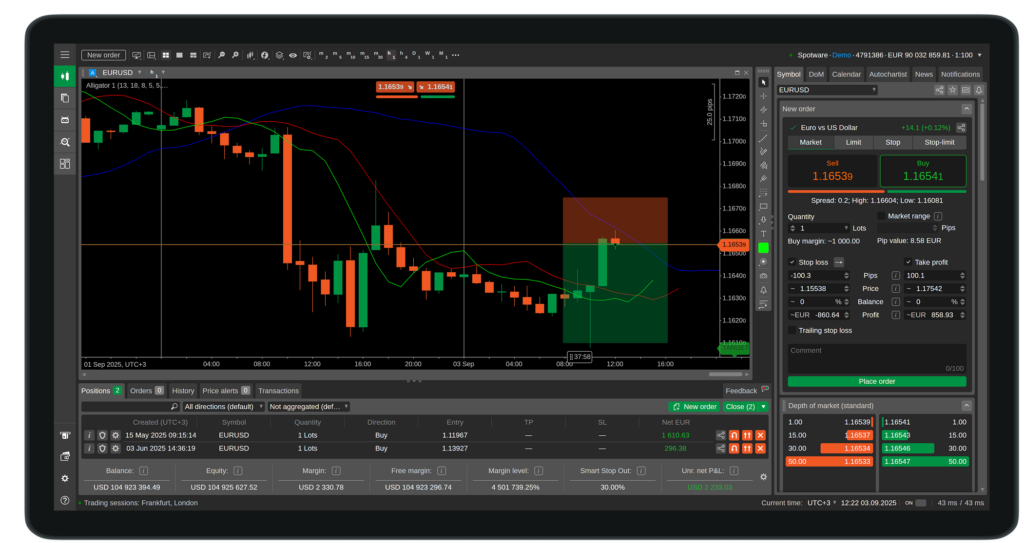
cTrader is a next-generation trading platform that allows traders to access the forex and CFD markets with ECN/STP execution, advanced charting features, and a modern interface designed for performance.
What makes cTrader different is not just its features — but its philosophy.
Unlike older platforms where brokers can influence execution behind the scenes, cTrader was created to:
- remove conflicts of interest,
- deliver fast and fair order routing,
- and provide complete transparency on pricing and execution.
To put it simply:
cTrader is the platform you choose when you want clean, fair, professional-grade trading.
2. Who Built cTrader and Why It Matters
cTrader was developed by Spotware Systems, a technology company known for its “Trader’s First” approach.
This philosophy affects everything in the platform:
- True market depth (Level II)
- Detailed execution transparency
- No dealing desk manipulation
- A modern, intuitive interface
- Continuous updates without sacrificing stability
Spotware’s goal wasn’t to replicate what competitors were doing — it was to fix what traders hated and build what traders truly needed.
3. Key Features of cTrader
cTrader is packed with functionalities, but what really sets it apart is the quality of execution and the clarity of its interface.
A Clean and Modern Interface
cTrader feels like a platform designed in the 2020s — not a relic of the early 2000s.
Charts are smooth, tools are organized intuitively, and you can build multi-monitor workspaces effortlessly.
Professional Charting Tools
- Over 40 timeframes
- Advanced chart types (tick, renko, range)
- One-click trading
- Dozens of built-in indicators
- Beautiful rendering at any resolution
Institutional Execution
cTrader is particularly valued by scalpers and day traders due to:
- ultra-fast execution speed,
- no requotes,
- and ECN/STP routing.
Multi-Device Ecosystem
cTrader works seamlessly across:
- Desktop
- Web
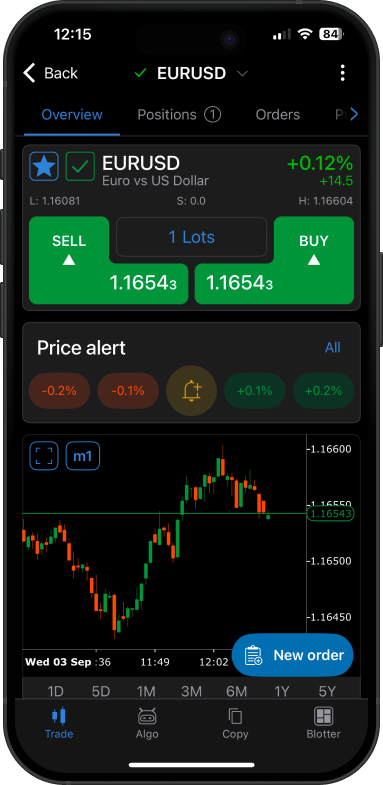
- Mobile (iOS & Android)
- cTrader Cloud
It syncs everything — layouts, watchlists, bots — making it accessible anywhere.
4. cTrader vs MetaTrader — A Real Comparison
Here’s a true, objective comparison designed for traders evaluating both platforms.
📊 cTrader vs MetaTrader Comparison Table
| Feature | cTrader | MetaTrader (MT4/MT5) |
|---|---|---|
| Interface | Modern, intuitive, clean | Outdated, functional but clunky |
| Execution Model | Designed for ECN/STP, transparent | Depends heavily on the broker |
| Programming Language | C# (industry standard) | MQL4/5 (proprietary, niche) |
| Chart Types | 40+ timeframes, renko, range, tick | Limited in MT4, expanded in MT5 |
| Depth of Market (DoM) | True Level II | Partial or simulated |
| Automation Tools | cTrader Automate + Cloud | MetaEditor + Strategy Tester |
| User Base | Growing fast, high-quality | Massive but outdated |
| Best For | Algo traders, scalpers, advanced users | Beginners, legacy EA users |
Verdict:
MetaTrader has the larger user base.
cTrader has the better technology.
If you’re entering algorithmic trading in 2026, cTrader provides a far more future-proof foundation.
5. What Is cTrader Automate (cAlgo)?
Now we move into the heart of the platform.
cTrader Automate — often called cAlgo — is the environment where traders build:
- cBots (trading robots),
- custom indicators,
- automated logic,
- backtests,
- and optimizations.
It uses C#, which is not only more flexible but also more maintainable compared to proprietary languages.
Why does this matter?
Because C# is:
- widely documented
- supported by Microsoft
- used by millions of developers worldwide
This opens the door to more advanced, structured, and clean algorithm design.
6. How Bots and Indicators Work Inside cTrader
In cTrader, automation revolves around two types of files:
- cBots → strategies that trade automatically
- Indicators → custom analytical tools
You can:
- attach multiple bots to multiple charts
- run bots on a VPS
- run bots on cTrader Cloud 24/7
- export/import .algo files
- use custom indicators inside strategies
cTrader was built to be friendly for both manual and algorithmic workflows.
But there’s a limitation:
Not everyone knows C#.
And here arrives AlgoBuilderX.
7. How AlgoBuilderX Elevates the Entire cTrader Ecosystem
AlgoBuilderX isn’t just another tool.
It’s the missing piece the cTrader ecosystem has needed for years.
👉 The Problem AlgoBuilderX Solves
Although cTrader Automate is powerful, building bots in C# presents challenges:
- not all traders know how to code
- debugging takes time
- converting TradingView indicators is complex
- testing logic visually is impossible
- many great ideas die before becoming real strategies
AlgoBuilderX changes everything.
👉 What AlgoBuilderX Actually Does
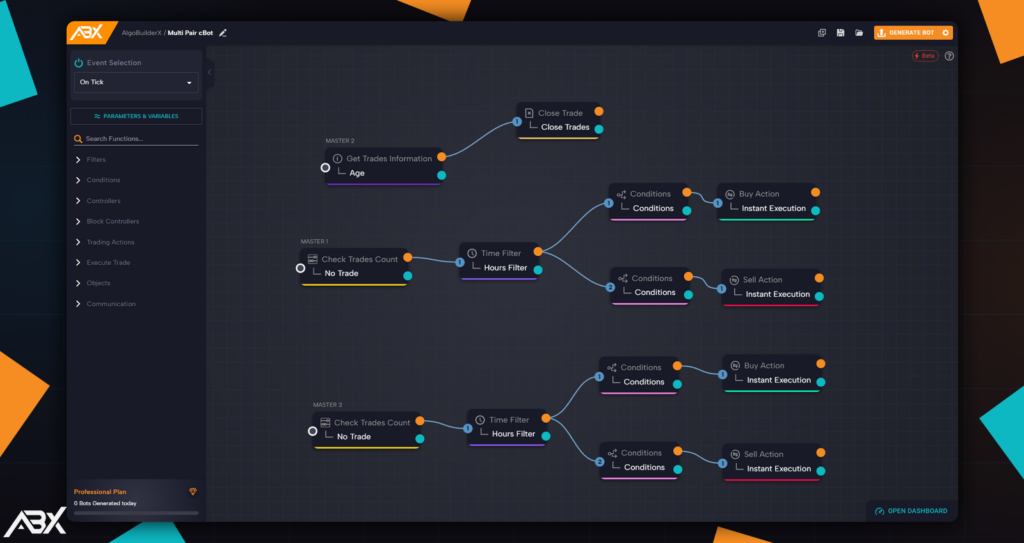
AlgoBuilderX is the first visual no-code builder for cTrader.
Instead of writing code, you build strategies like assembling a logical blueprint:
- drag blocks
- connect conditions
- add filters
- configure risk settings
- export to .algo
The platform then generates the C# logic automatically.
With AlgoBuilderX, you can:
- automate any idea visually
- import custom cAlgo indicators
- integrate TradingView signals via webhook
- convert Pine Script into cAlgo using our custom GPT
- export cBots ready for cTrader Automate
- run them locally, on a VPS, or on cTrader Cloud
- eliminate 95% of debugging headaches
Automation becomes:
“Build → Export → Trade.”
Not:
“Study C# for 8 months → Debug → Cry → Try again.”
👉 The Real Value of ABX (What Users Love Most)
1. It removes the coding barrier
Traders can finally express strategy logic without fighting syntax.
2. It enables creativity
People who never wrote code are now building complex multi-condition bots.
3. It integrates perfectly with cTrader
Exported bots run natively, smoothly, and reliably.
4. Community-driven validation
Our Discord is full of users sharing:
- backtests
- FTMO passes
- screenshots of consistent results
- indicator conversions
- strategy structures
There is nothing like this in the cTrader ecosystem.
8. How to Use cTrader Effectively (Beginner-Friendly Section)
Understanding cTrader’s interface is the first step. Here’s what beginners should focus on:
Workspace Basics
- Chart layout
- Watchlist creation
- Multi-chart configurations
Order Execution
- Market, limit, stop orders
- Quick-trade buttons
- Understanding slippage and execution speed
Charting
- Timeframes
- Indicators
- Drawing tools
Risk Management
- Position sizing
- Stop loss logic
- Monitoring open positions
🎥 Full Video Tutorial: TradingNut Explains cTrader (21 Minutes)
This video offers an excellent walkthrough for beginners who want to master cTrader quickly. It covers charting, execution, interface management, and tips that even experienced traders appreciate.
Conclusion — Why cTrader Is the Platform of the Future
If you came here wondering “what is cTrader”, now you know:
It’s not just a trading platform.
It’s a modern ecosystem built for transparency, performance, and automation.
Compared with older alternatives, cTrader stands out because:
- it’s faster,
- cleaner,
- fairer,
- more advanced,
- and built for 2025 and beyond.
And with AlgoBuilderX, traders can now build automated strategies for cTrader without programming, unlocking a level of creative freedom that was impossible before.
cTrader is the engine.
AlgoBuilderX is the key that unlocks it.
FAQ — Frequently Asked Questions About cTrader (2025)
What is cTrader used for?
cTrader is a modern forex and CFD trading platform designed for transparent ECN/STP execution, advanced charting, and professional-grade tools. It is used by traders who want speed, reliability, and a clean workflow without broker-side manipulation.
Is cTrader better than MetaTrader?
It depends on what you value.
cTrader offers a more modern interface, a cleaner execution model, better charting and transparency, and native C# support for algorithmic trading.
MetaTrader has a larger user base and more legacy EAs—but its technology is older.
For most 2025 traders, cTrader is the superior platform technologically.
Does cTrader support automated trading?
Yes. cTrader includes cTrader Automate (formerly cAlgo), a full environment for building and running trading bots (cBots) and custom indicators written in C#.
Strategies can run on desktop, VPS, or cTrader Cloud Automate.
Do I need to know coding to use cTrader Automate?
Not necessarily.
With AlgoBuilderX, you can build complete automated strategies visually, without writing a single line of code.
ABX exports bots in native .algo format, ready to run directly inside cTrader.
Is cTrader free to use?
Yes. cTrader itself is free; only the broker determines commissions or spreads.
cTrader Automate, backtesting, and Cloud features are available without additional platform fees.
Can I convert TradingView indicators to cTrader?
Yes.
You can convert Pine Script indicators into cAlgo format using:
the ABX Code Assistant (a custom GPT built for conversion),
or by manually rewriting the code in C#.
After converting, you can import the indicator directly into AlgoBuilderX or cTrader Automate.
Does cTrader work for prop firm challenges?
Absolutely. Many prop firms allow cTrader accounts, and several AlgoBuilderX users have successfully passed challenges (including FTMO) using cBots built with ABX.
Is cTrader good for beginners?
Yes.
Its clean UI, intuitive workflow, and powerful charting make it a strong platform for beginners—while still offering advanced tools for professional traders.
Can I use cTrader bots on mobile?
You cannot run bots directly on mobile, but you can monitor and manage them through cTrader Mobile.
Execution must run on:
– Desktop
– VPS
– or cTrader Cloud Automate
How does AlgoBuilderX integrate with cTrader?
AlgoBuilderX exports strategies as .algo files.
You open them in cTrader Automate, click Build, and your bot is ready to run live.
ABX also supports:
– webhook connections from TradingView
– custom indicator imports
– full visual logic building
– multi-event workflows (OnTick, OnBar, OnPosition)
It is currently the easiest and fastest way to create cTrader bots without coding.